
Instagram has finally pulled the plug on the low-effort aggregation era. If you’ve spent the last three years building a brand by scraping viral Reels, slapping on a generic caption, and hitting 'post,' you aren't just facing a dip in reach—you are facing systemic exclusion from the Recommendation engine. The platform is now actively identifying 'serial aggregators' and replacing their posts with the original creator’s version in the Explore and Reels tabs.
This isn't a minor tweak. It is a fundamental realignment of how distribution is earned. By the end of this guide, you will have a workflow to audit your current assets, implement 'significant value' changes that satisfy the new algorithm, and transition to a 'UGC-plus' model that protects your account’s standing while maintaining a high-volume posting schedule. You will need access to your Instagram Professional Dashboard, a basic video editing suite (like CapCut or Adobe Premiere), and a clear understanding of your niche’s top original creators.
TL;DR
- The Penalty: Accounts that post unoriginal content more than 10 times in 30 days are now ineligible for recommendations.
- The Solution: You must add 'significant creative value' through commentary, reaction, or heavy transformative editing.
- The Pivot: Move toward 'UGC-plus'—licensed or partner-sourced content with your brand’s unique editorial layer.
Step 1: Conduct an 'Originality Audit' of Your Professional Dashboard
Before you change your creative output, you have to know if you're already on the blacklist. Instagram doesn't always send a formal notification when it flags you for unoriginality, but the evidence is hidden in your Account Status. If you have been flagged, your content won't surface to non-followers, effectively killing your growth.
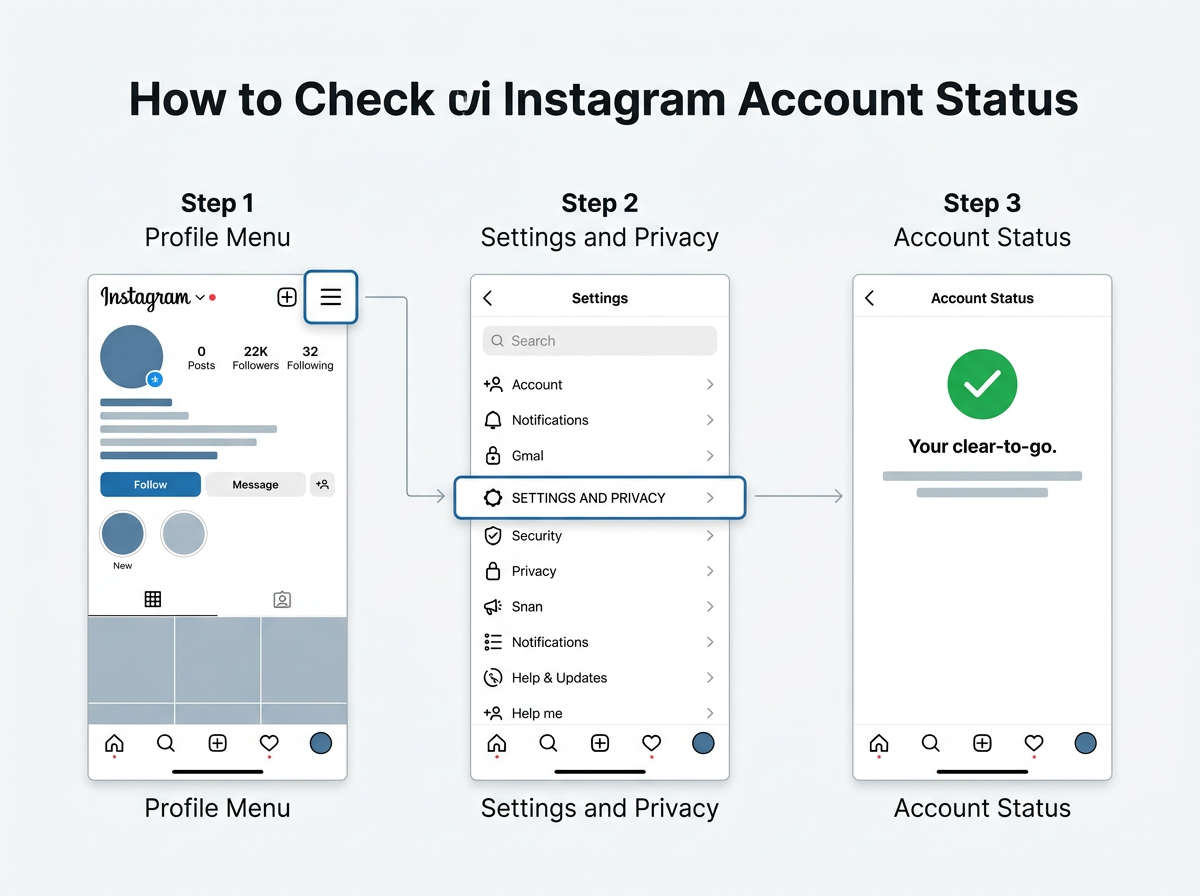
Open your Instagram app, go to your profile, tap the hamburger menu, and select 'Account Status.' Look specifically for 'Recommendation Guidelines.' If you see a yellow warning or a strike related to unoriginal content, you have 30 days to clean up your act before the penalty becomes a permanent anchor on your reach.
Why it matters: You cannot out-post a recommendation ban. If the platform has categorized you as an aggregator, even your rare original posts will suffer because the account-level trust score has been nuked. Per Instagram’s 2024 transparency updates, they are looking for a 'pattern of unoriginality.' One or two reposts won't kill you, but a feed that is 90% scraped content will.
Common Pitfall: Many managers assume that 'credit in caption' satisfies the algorithm. It doesn't. Giving credit is a moral and legal obligation, but to the algorithm, a credited repost is still a duplicate. The machine sees the pixels, not the text in your caption.
Step 2: Implement the 'Transformative Layer' Requirement
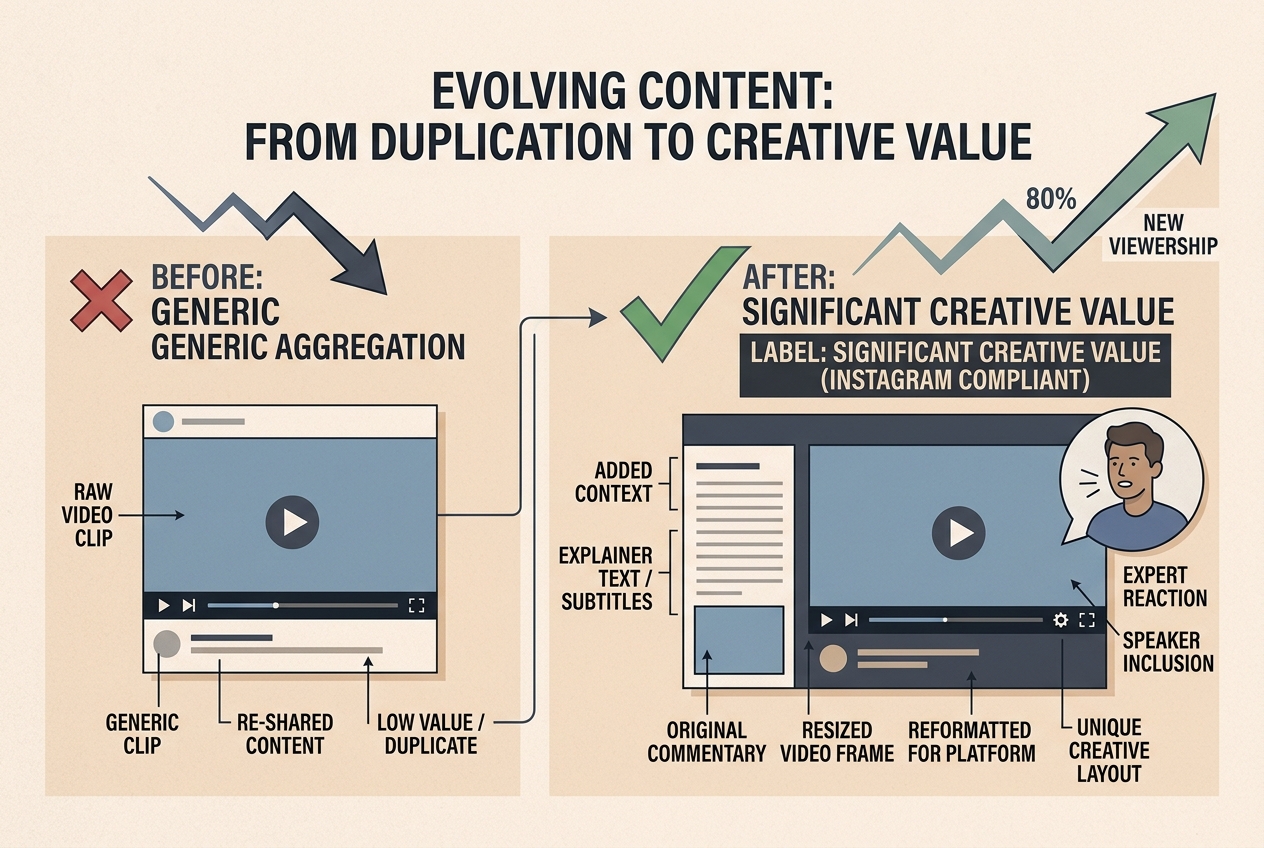
Instagram’s documentation defines original content as something that has been 'materially transformed.' This is the crux of the new strategy. If you must use existing footage, you have to add more than just a filter. You need to provide a reason for the video to exist on your page specifically.
Start by using the 'Remix' feature or importing footage into an editor to add a 'Picture-in-Picture' commentary. This is the 'Reaction' meta that has dominated YouTube for a decade. By adding your face, your voice, or a significant text-based analysis that moves the story forward, you move from 'thief' to 'critic' or 'curator' in the eyes of the AI.
What to do:
- Take the source video and crop it to 70% of the screen.
- Add a 'Green Screen' or 'Split Screen' overlay of yourself providing context.
- Use a unique voiceover—do not use the built-in AI voices that everyone else uses.
- Add dynamic captions that use your brand's specific font and color palette.
Why it matters: The algorithm uses frame-matching technology to find duplicates. By changing the composition, adding an overlay, and introducing new audio tracks, you create a new digital fingerprint. More importantly, you provide 'value-add' that justifies the recommendation to a new user.
Common Pitfall: Avoid the 'silent reaction.' Simply pointing at a video or nodding while it plays is no longer considered 'significant transformation' by the 2024 standards. If you aren't speaking or adding a unique editorial perspective, you're still in the danger zone.
Step 3: Transition to a 'UGC-Plus' Sourcing Model
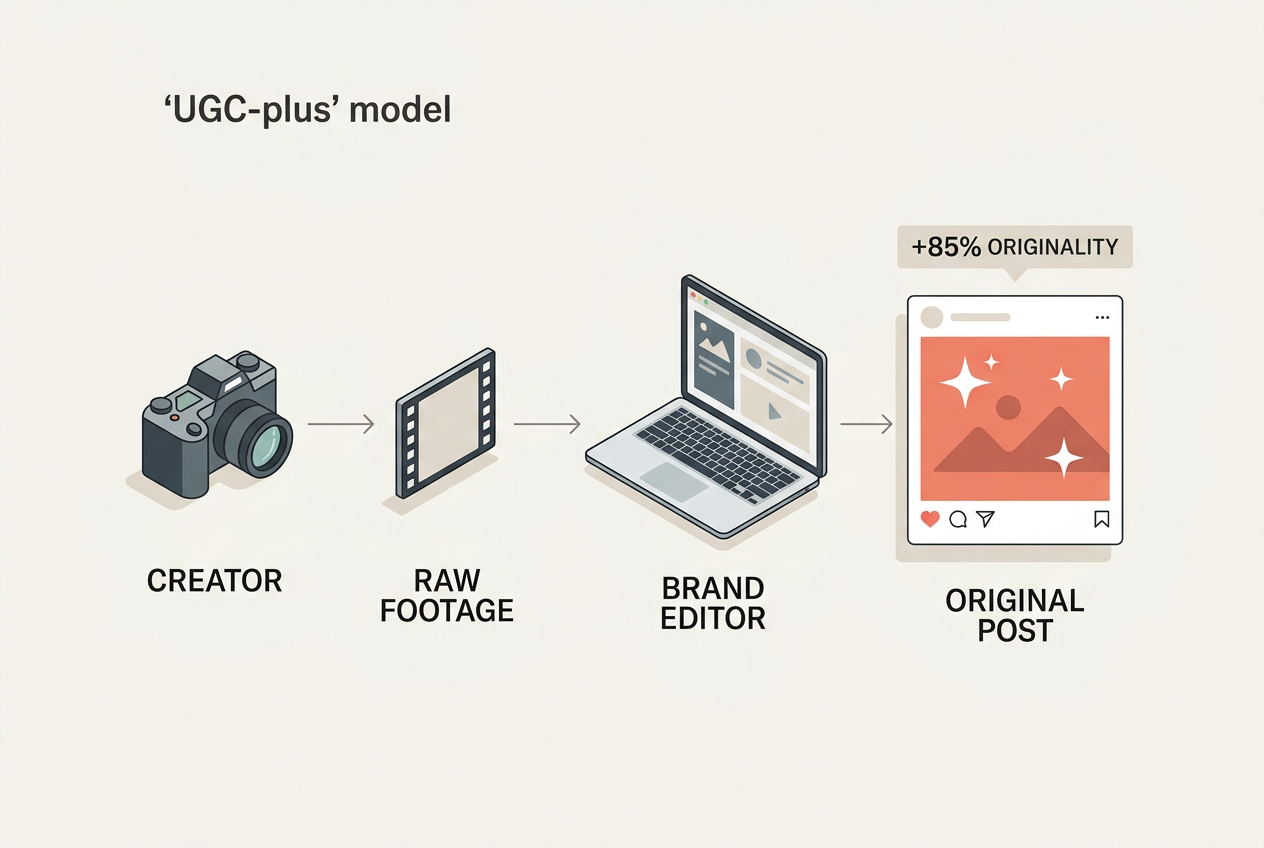
If you can’t aggregate, you must collaborate. The 'UGC-plus' model involves sourcing raw footage from creators (with permission) and then applying your brand's high-production editing style to it. This isn't reposting; it's co-production.
Reach out to smaller creators in your niche. Offer to feature them in exchange for the raw files of their top-performing videos. Once you have the raw file, you aren't fighting the 'duplicate' fingerprint because you are the first one to upload that specific edit. This is a tactic used heavily by brands like Gymshark and Red Bull—they use athlete footage but the final product is distinctly 'theirs.'
Why it matters: This solves the volume problem. Most social managers can't film five original Reels a day. By sourcing raw UGC, you maintain the volume of an aggregator but the 'originality' score of a creator. According to recent industry benchmarks, 'co-authored' posts (using the Collab feature) see up to a 40% higher engagement rate than standard posts because they tap into two distinct audience graphs simultaneously.
Common Pitfall: Don't forget the legal side. Even if the algorithm doesn't catch you, the creator might. Always have a simple DM-based or email-based licensing agreement. In the era of TikTok whiplash and changing ownership structures (as noted by Digiday in early 2026 TikTok ownership shifts), owning your rights is the only way to ensure long-term account safety.
Step 4: Leverage 'Agentic AI' for Original Asset Generation
If you lack a film crew, use the tools that the new wave of 'faceless' creators are using to bypass the duplicate penalty. We aren't talking about ChatGPT-generated scripts, but rather 'Agentic AI' tools like Claude or specialized video generators that can create unique B-roll from scratch.
As discussed in recent digital marketing circles AI tools for marketers, tools like Claude can now help you build custom workflows or even generate code for unique web-based visualizers that you can screen-record for original background footage. Instead of using a viral 'satisfying' video that has been seen 10 million times, generate your own unique 3D render or data visualization.
What to do:
- Use an AI image generator (like Midjourney) to create a series of high-fidelity backgrounds.
- Use a tool like Runway or Luma to animate those backgrounds.
- Layer your educational or entertainment content over these 100% original visuals.
Why it matters: These assets have no previous digital fingerprint on the Meta servers. They are, by definition, original. This allows you to scale production without ever touching a camera, while remaining completely safe from the unoriginality filter.
Common Pitfall: Over-reliance on 'stock' AI. If your AI-generated video looks like every other 'AI-hustle' account, users will swipe past. Use AI to create the components of your video, but handle the final assembly and 'human' touch manually to ensure high retention.

Step 5: Verify Your Recovery and Monitor 'Originality Reach'
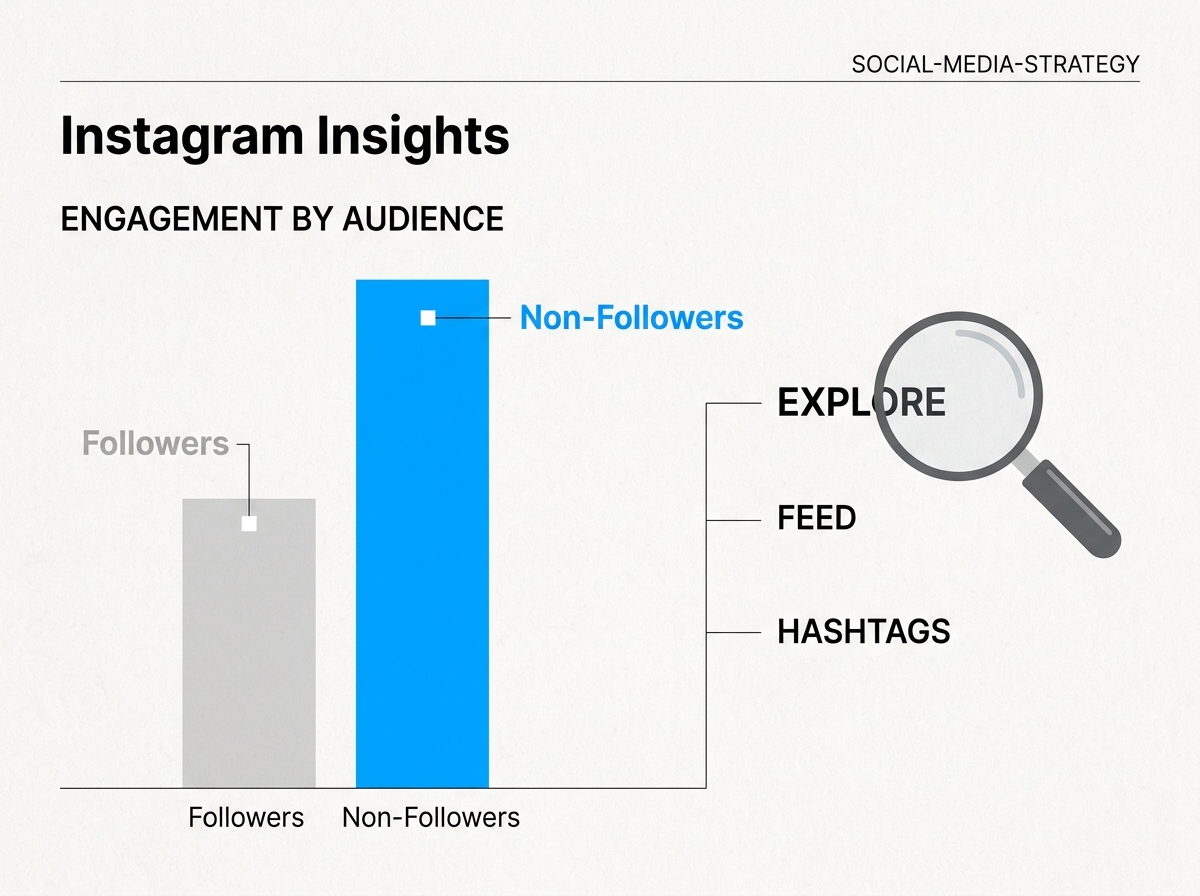
How do you know if the pivot is working? You need to look at the ratio of 'Followers vs. Non-Followers' in your reach breakdown. For a healthy, recommendation-eligible account, non-followers should account for 40% to 70% of your total reach on Reels.
Check your insights for every post over a 14-day period. If you see that your 'Original' posts (the ones you edited heavily) are hitting 60% non-followers, while your 'Curation' posts are hitting 5%, the algorithm is telling you exactly what it wants.
Verification checklist:
- Account Status remains 'Green' with no recommendation violations.
- The 'Originality' label does not appear on your videos (Instagram has begun testing a public label for unoriginal content).
- You see a steady climb in 'Home' and 'Explore' traffic in your traffic source breakdown.
Why it matters: Instagram's ranking signals are now heavily weighted toward 'New Discovery.' If you aren't reaching non-followers, your account is effectively a closed loop. You will eventually see a slow decline as users churn and no new ones enter the top of your funnel.
Common Pitfall: Don't get discouraged by an initial drop in views. When you stop posting 'viral' unoriginal content, your views might dip because you're no longer 'stealing' someone else's proven engagement. However, the views you do get will be higher quality and will actually contribute to account growth rather than putting it at risk.
Three Related Tactics to Scale Originality
Once you've stabilized your account and cleared any penalties, you can begin to scale. The goal is to move from 'surviving' the update to 'thriving' because your competitors are still stuck in the old aggregation mindset.
-
The 'Newsroom' Approach: Treat your page like a niche news outlet. Instead of just reposting a clip of a new product, do a 60-second 'breakdown' of why it matters. Use the clip for only 5-10 seconds of the video, and spend the rest on your analysis. This is how accounts like 'Morning Brew' or 'SGE' maintain massive reach with minimal 'original' filming.
-
Collaborative Collections: Use the 'Saved' folders to identify trends, then hire a creator to 're-shoot' the trend specifically for your brand. This gives you the 'viral' DNA of the trend with 100% original pixel data. This is particularly effective in the beauty and tech niches where 'aesthetic' is everything.
-
Audio-First Originality: Sometimes, the 'originality' isn't in the video, but the sound. Create a unique, high-value audio track (a tutorial, a funny commentary, or a bespoke music mix). If other people start 'Remixing' your original audio, Instagram views you as the source of truth, giving your account a massive boost in authority and recommendation priority.
Instagram's shift away from mass-aggregation is a painful transition for many, but it's a necessary one for the platform's longevity. By moving toward a model that prizes 'significant creative value,' you aren't just avoiding a penalty—you're building a brand that Meta actually wants to promote.
FAQ