Instagram has finally handed users the nuclear option. After years of complaints about 'stale' feeds and algorithmic ruts, the platform's new Your Algorithm tool allows anyone to wipe their interest graph clean and start from scratch. For the casual user, it's a refreshing palate cleanser. For you, the brand marketer, it is a high-stakes stress test.
By the end of this guide, you will have a repeatable framework for auditing how your brand surfaces in a 'cold start' environment. You'll move beyond vanity metrics like follower count and understand the specific signals that keep you in the feed after a user hits the reset button.
Before you start, you'll need a secondary 'clean' Instagram account (not your brand handle), access to your current Meta Business Suite insights, and a spreadsheet to track surfacing patterns across different persona simulations.
Why the Manual Reset Changes the Performance Marketing Game
For years, we've relied on the 'momentum' of the algorithm. If a user followed you in 2021, you likely stayed in their peripheral vision through a mix of historical affinity and sheer volume. That safety net is gone. When a user triggers a manual reset, Instagram treats them like a brand-new sign-up. The platform immediately begins looking for fresh signals—re-evaluating every account the user follows based on immediate, current relevance rather than years of passive lurking.
TL;DR
- The Reset is a Purge: Users are using the Your Algorithm tool to clear out 'clutter' brands they no longer care about.
- Audit for Survival: You must test how your content performs when it has zero historical data to lean on.
- Signal Priority: Save, Share, and Time-Spent are the three pillars that will get you back into a reset feed.
- Persona Mapping: You cannot audit for everyone; you must audit for 3-4 specific customer archetypes.
This isn't just about aesthetics. In an era where TikTok marketing partners like YATOP are being acquired for $10.8 million (per TipRanks data from April 2026), the valuation of social presence is tied directly to algorithmic resilience. If you can't survive a reset, your organic reach is effectively zero.
Step 1: Establish Your Control Personas and 'Clean' Accounts
You cannot audit your brand health from your own phone. Your personal feed is poisoned by your own behavior. To see how the algorithm truly treats your brand, you need to simulate your target audience from a blank slate.
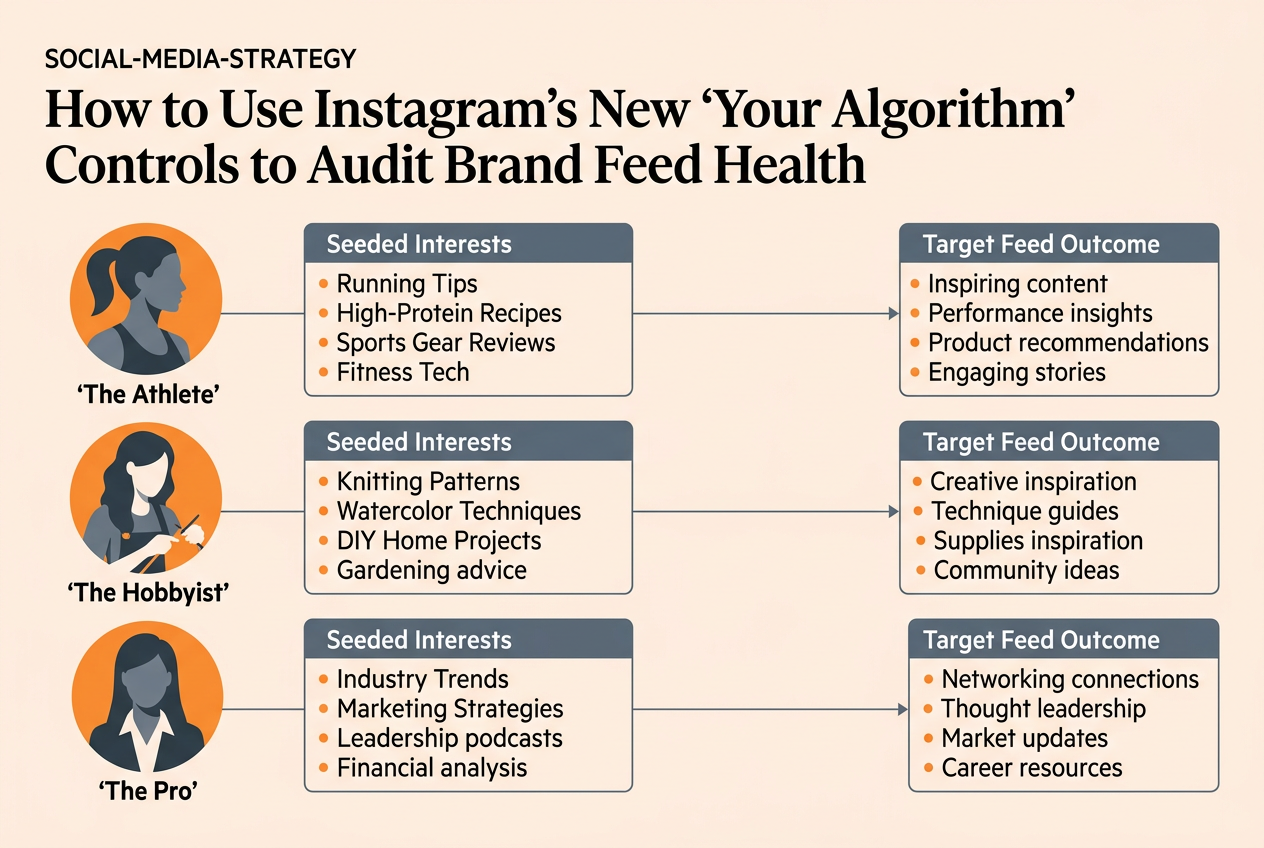
Create three distinct test accounts. Do not link them to your existing Meta accounts. Each should represent a core customer segment. For a fitness brand, this might be 'The Data-Driven Marathoner,' 'The Casual Yoga Enthusiast,' and 'The Gear-Obsessed Home Gym Owner.' Use a VPN or separate devices if possible to ensure the IP doesn't immediately link these to your brand's office location.
Why it matters: Instagram's ranking isn't a single 'master' list. It is a series of micro-decisions based on the specific niche interest graph. If you only test one persona, you're getting a narrow, potentially misleading view of your brand's health.
Common Pitfall: Many managers make the mistake of following their brand account immediately on these new profiles. Don't. The goal is to see if you show up in the 'Suggested for You' or 'Explore' tabs before the follow. If you have to search for yourself, you're already losing the discovery battle.
Step 2: Trigger the 'Your Algorithm' Reset and Seed Interests
Once your accounts are live, navigate to the Settings > Content Preferences > Your Algorithm menu. Even on a new account, hitting 'Reset' ensures you are starting with a baseline empty state. Now comes the active part of the audit: seeding.
For each persona, spend 20 minutes interacting with competitors and adjacent interests, but not your own brand. If you are a skincare brand, have your 'Clean Beauty' persona like posts from Sephora, follow three dermatologists, and watch three Reels about SPF.
What to do:
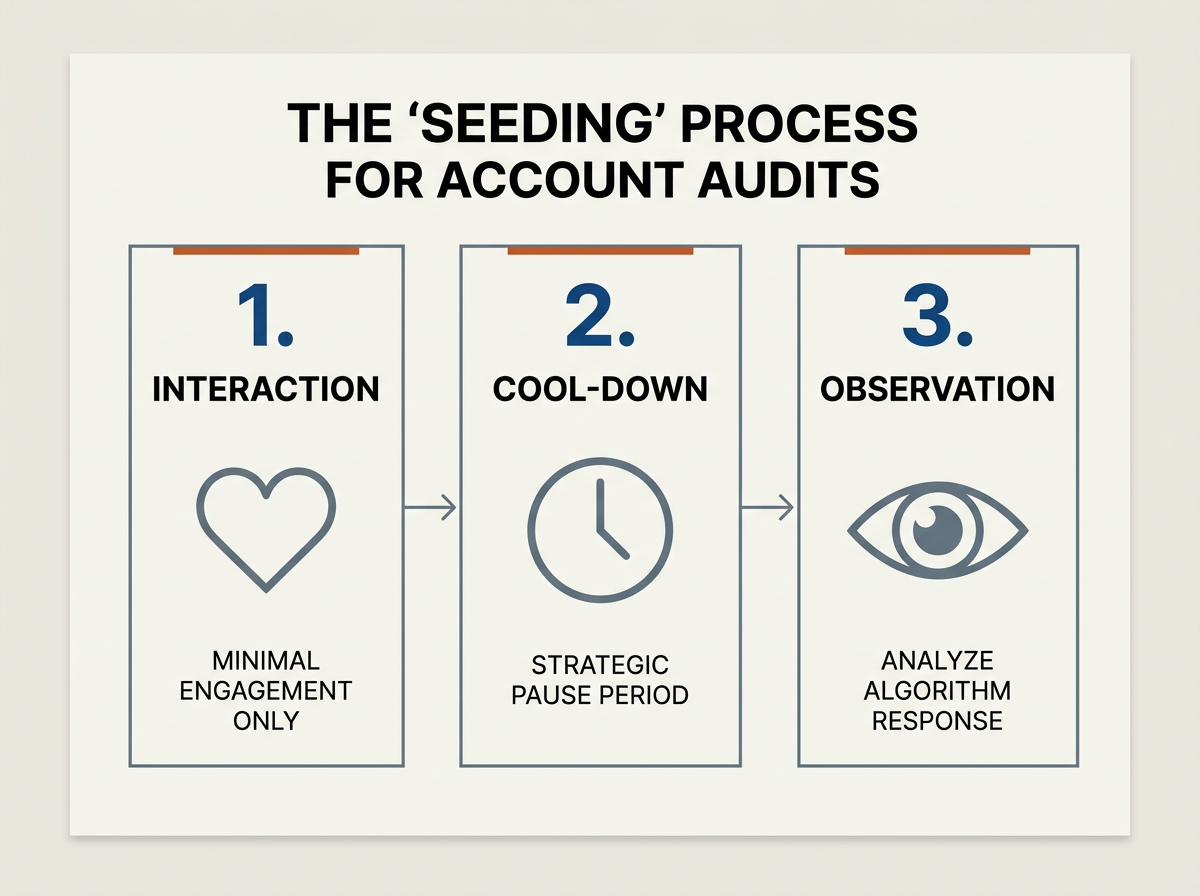
- Go to the Explore page for each persona.
- Interact (Like, Save, or Watch >50%) with 10 posts in your niche.
- Close the app for one hour.
- Re-open and scroll the main feed to see which 'Suggested' accounts appear.
Why it matters: This simulates the 'first 24 hours' after a real user resets their feed. You need to know if your content is high-signal enough to be the first thing Instagram recommends to a user who just signaled interest in your category. If your competitors show up and you don't, your content lacks the 'categorical authority' the algorithm looks for.
Common Pitfall: Don't over-interact. A real user doesn't like 100 posts in a row. Keep it natural—3-5 likes and 2-3 saves per session—to avoid being flagged as a bot, which will skew your results with 'low-trust' feed ranking.
Step 3: Analyze Content Type Surfacing (Reels vs. Carousels)
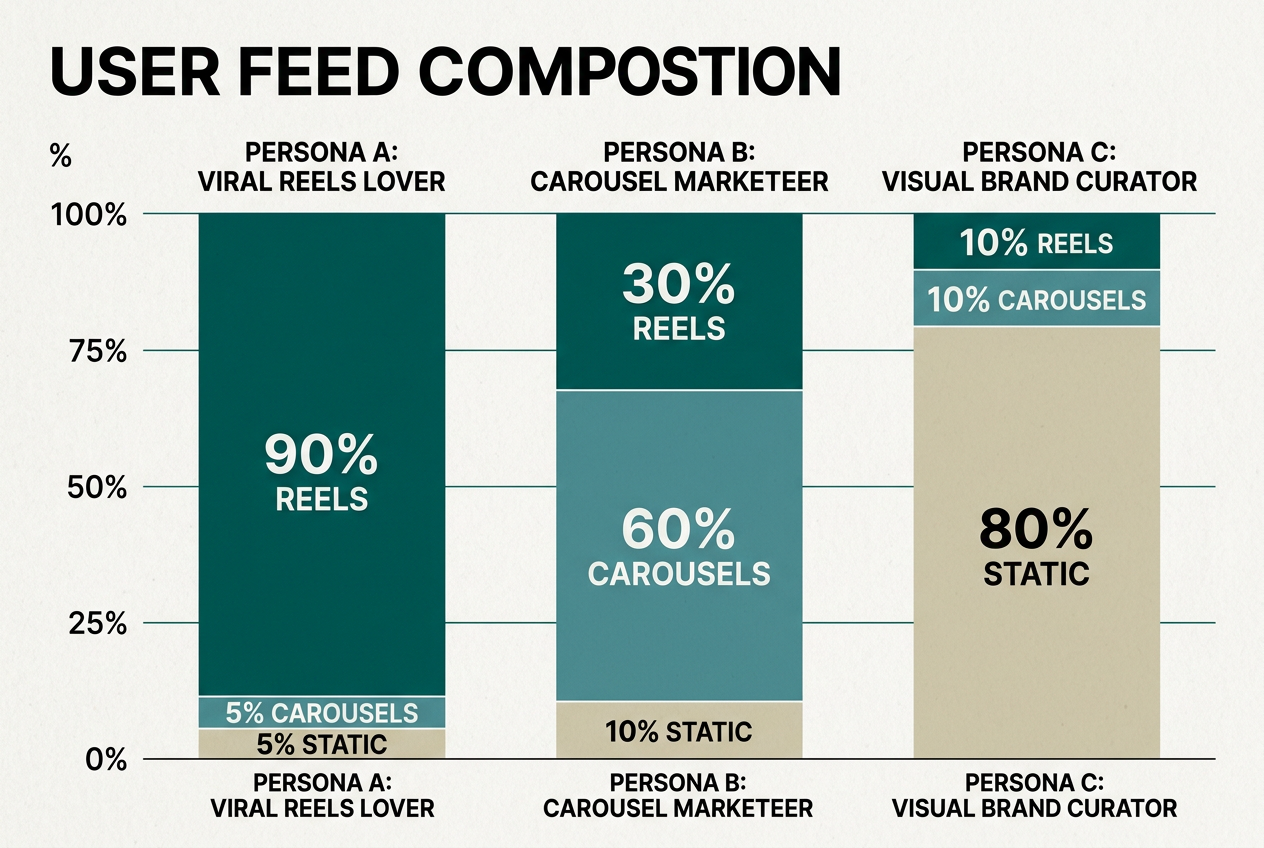
Now that the feed is seeded, observe the format of the content that Instagram is pushing to your new personas. Is the 'Marathoner' persona seeing 90% Reels? Is the 'Yoga' persona seeing primarily Carousels?
Instagram's feed ranking has shifted heavily toward 'Time Spent' as a primary metric. In late 2025, internal Meta leaks suggested that the 'Stop-and-Stare' metric (pausing on a frame for more than 2 seconds) now carries more weight than a standard Like. During your audit, look at your brand's recent posts. If you are heavily invested in single-image posts but the 'reset' feed is only showing high-motion Reels, you have a format mismatch.
What to do:
- Document the first 20 posts in the 'Reset' feed for each persona.
- Categorize them by format (Reel, Carousel, Static, Ad).
- Compare this to your brand's current content mix.
Why it matters: If the algorithm is rewarding Carousels for your niche but you are posting 100% Reels, you are fighting an uphill battle. The 'Your Algorithm' tool effectively tells you what the platform thinks 'good' looks like for a fresh start.
Common Pitfall: Ignoring the 'Suggested' posts. After a reset, Instagram aggressively inserts 'Suggested for You' content between posts from accounts you follow. If your brand isn't appearing here for your target persona, your 'SEO' (Search and Discovery) signals are weak.
Step 4: The 'Save-to-Signal' Stress Test
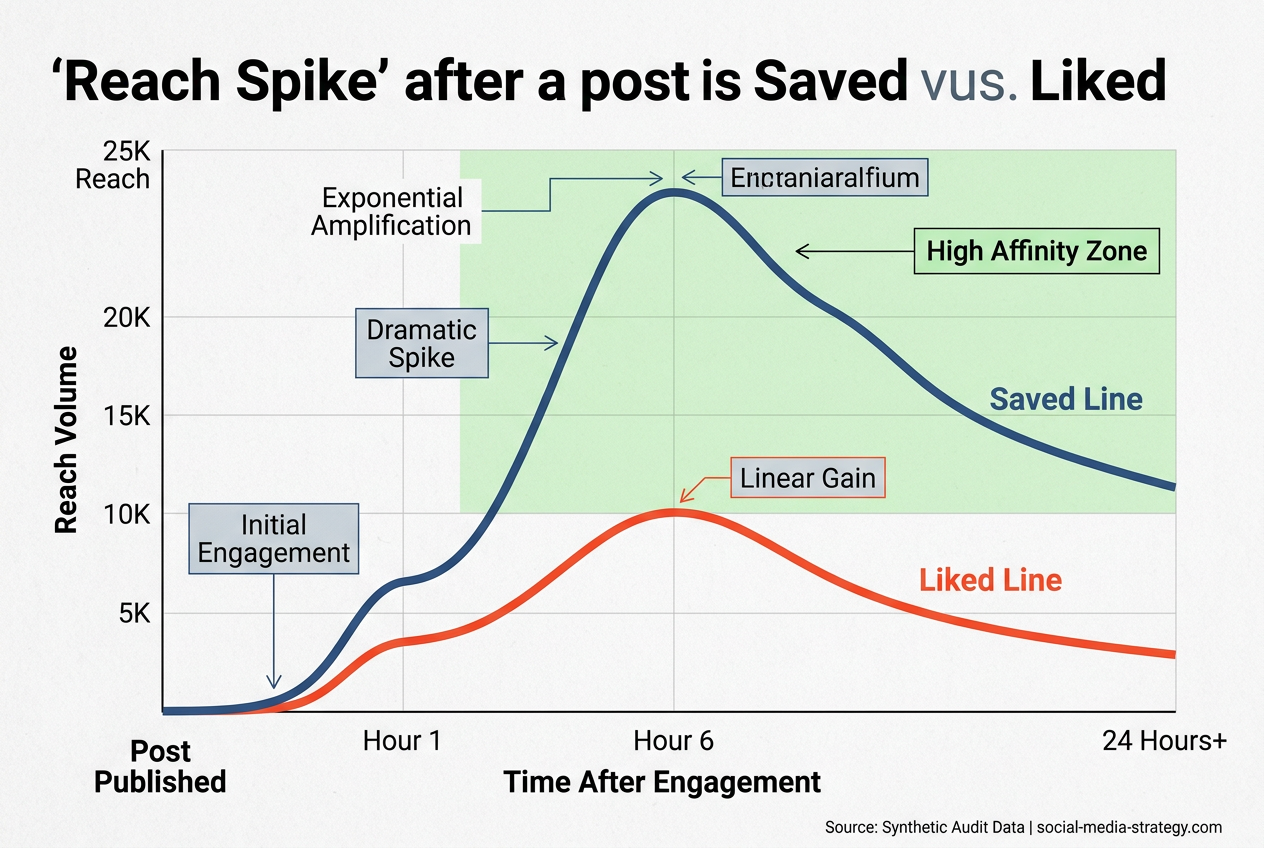
This is the most critical part of the audit. On your test accounts, find one of your brand's recent posts (search for it if you have to). Perform a 'Save' and a 'Share to DM.' Then, close the app.
Wait two hours and check the feed again. Does your brand now dominate the top of the feed? Or does it disappear? A healthy brand with high 'algorithmic authority' should take over the top 3 spots in the feed immediately after a high-value interaction like a Save.
Why it matters: The manual reset is designed to help users find what they actually value. Instagram's chief, Adam Mosseri, has repeatedly stated that Sends/Shares are the most important signal for reach. If a Save doesn't trigger a 'Follow-up' surge in your test, your content is being treated as 'low-affinity'—likely because it's too broad or lacks a clear niche signal.
Common Pitfall: Testing with old content. The algorithm prioritizes recency more than ever after a reset. Only test with posts from the last 48-72 hours.
Step 5: Verification — How to Know Your Audit is Accurate
You'll know your audit is successful when your 'Clean' accounts begin to mirror a real customer's journey. The 'Verification' moment happens when you can predict, with 80% accuracy, which of your brand's posts will show up first based on the seeding you did in Step 2.
If your brand consistently appears in the top 5 'Suggested' slots for your target persona within 24 hours of account creation, your Feed Health is excellent. If you remain invisible even after direct interaction, you have a 'Signal Gap.' This often happens when a brand uses too many generic hashtags or fails to use the 'Add Topics' feature correctly during the upload process.
Learn more about optimizing for Instagram Topics
Three Related Tactics to Try Next
Once you've completed your audit and identified your gaps, don't just sit on the data. The 'Your Algorithm' reset is an ongoing threat/opportunity. Move into these advanced tactics to solidify your standing:
- The 'Topic-First' Content Pivot: If your audit showed you're not surfacing in 'Suggested' feeds, stop using 30 hashtags. Instead, use 3-5 highly specific tags and meticulously select 3 'Topics' in the Instagram upload menu that align with your persona's seeded interests.
- DM-First Engagement Campaigns: Since Shares are the king of signals, create content specifically designed to be sent to a friend (e.g., 'Tag a friend who needs this' is dead; try 'Send this to the person who always forgets their SPF').
- Collaborative Collections: Use the 'Collaborative Collection' feature with influencers in your niche. This 'borrows' their algorithmic authority and forces your brand into the feeds of users who have reset their preferences but still follow those key creators.
We're seeing a massive shift in how attribution is handled in this new environment. As marketers brace for 'TikTok whiplash' in 2026 (per Digiday), the stability of your Instagram 'interest graph' standing is your best defense against platform volatility. Don't wait for your followers to hit the reset button—audit now so you're the one they choose to keep.
FAQ